
Freshsales CRM: Skyrocket Your Team’s Sales Performance

已更新:4月16日

Freshsales (formerly Freshworks CRM) is the CRM system under the Freshworks umbrella. Beyond standard Customer Relationship Management (CRM), it integrates a Marketing Automation System (MAS) and a Customer Data Platform (CDP). From attracting potential leads to managing existing customers, Freshsales provides a complete pre-sales management solution.

In previous articles, we introduced the marketing automation capabilities of Freshsales, specifically how to use Freddy AI to segment customers, deliver tailored content to different groups, and proactively engage with customers to effectively increase purchase probability.
Related Reading: [Freshworks CRM Tips] From Lead Acquisition to Closing Deals: Accurately Target Your Ideal Customers
Today, we are going to introduce the core CRM features of Freshsales.
Many companies view the sales department as the locomotive of the organization; a strong sales team drives the company's performance to take off. For a sales team, having a good CRM tool helps record customer information and manage orders. It not only improves the work efficiency of sales representatives but also makes it easier for managers to track the progress of current cases and obtain data reports on various metrics.
In a study by the Harvard Business Review, over half (52%) of high-performing salespeople surveyed said they rely on fully utilizing their company's CRM technology to boost performance.
According to a Forrester report, 90% of respondents stated that their companies saw significant revenue or cost improvements after implementing a CRM. Among them, 40% of organizations saw revenue growth of 11-20%, which led 22% of the surveyed enterprises to decide to expand their use of CRM.

Related Reading: 89% Companies See Revenue Bump After New CRM Implementation
Why Do We Need CRM Tools?
Collecting Complete Customer Data
CRM tools can record all information related to customers. In addition to contact details, location, company, and social profiles, it also includes the status and messages of your interactions with them. Because Freshsales integrates Marketing Automation (MAS) features, it can record the entire sales journey from a lead to an actual customer. This allows all team members to view the customer journey and provide appropriate responses and interactions.
Increasing Productivity
Most sales representatives and managers spend a large portion of their day on management and record-keeping. With a CRM system, most daily tasks—such as sending emails, updating databases, and setting reminders—can be completed using automation settings. This frees up more time for the team, allowing salespeople to focus on more important work like negotiation and communication with customers, thereby increasing the sales team's productivity.
Data Visualization
Enterprises usually collect massive amounts of lead and customer data from various channels, but how do you find effective leads among them? By regularly tracking leads and using CRM tools to record customer engagement and interest in products, Freshsales can provide analysis based on this information. It transforms data into dashboards, helping teams grasp key numbers, generate insights, and make correct decisions based on data.
Freshsales Advantages
1. Opportunity Management
Pipeline: Sales Process Visualization
Sales involve a series of repeatable steps. From acquiring a lead to closing a deal, you need an effective sales process to help you succeed. To implement a sales process, you need to create and manage your sales pipeline.

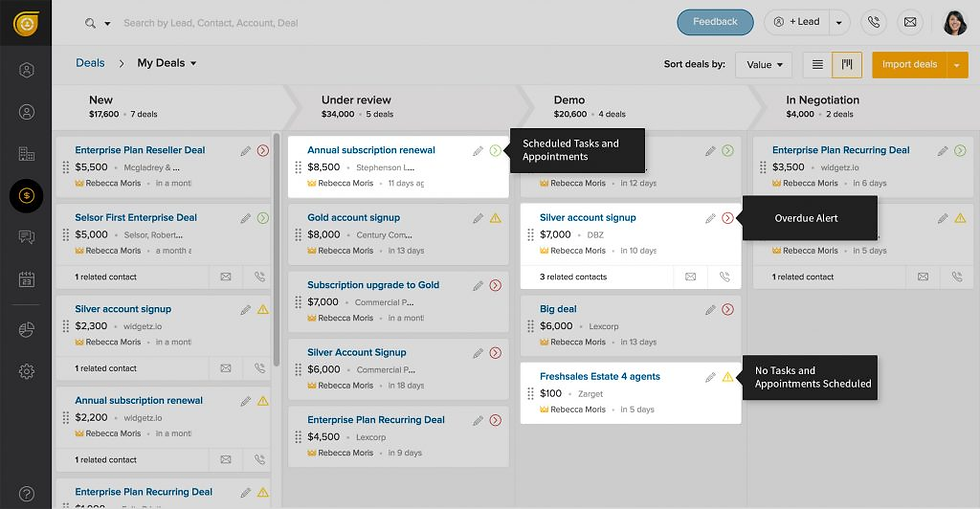
Freshsales' Pipeline visualizes the sales process, making it easy to manage and track the progress of every deal in the channel. You can also use filters to filter out specific categories of orders and generate customized reports.
For salespeople, they can follow the sales process step-by-step to win orders and even use designed automated processes (introduced below) to improve efficiency. Meanwhile, managers can quickly grasp the status of every order, making team collaboration more seamless. Using a collaborative CRM like Freshsales helps share information among the entire team, departments, and internal/external stakeholders to provide better customer service at every touchpoint.

Deal Pipeline Management
Calling and emailing customers, scheduling meetings, and creating tasks are indispensable sales activities for winning opportunities. In Freshsales, different colored icons are displayed on each opportunity, allowing you to see at a glance which opportunities lack customer interaction. This helps the team quickly identify the contact status with customers and take action.
Create Multiple Sales Pipelines
When a company scales internationally, has different teams in multiple regions, different team types (Inside Sales, Field Sales), or even targets different tiers of customers (Silver, Gold, Platinum), using a single sales pipeline to manage all opportunities is not feasible. Freshsales allows for the creation of multiple sales pipelines, enabling you to manage opportunities with different sales processes.
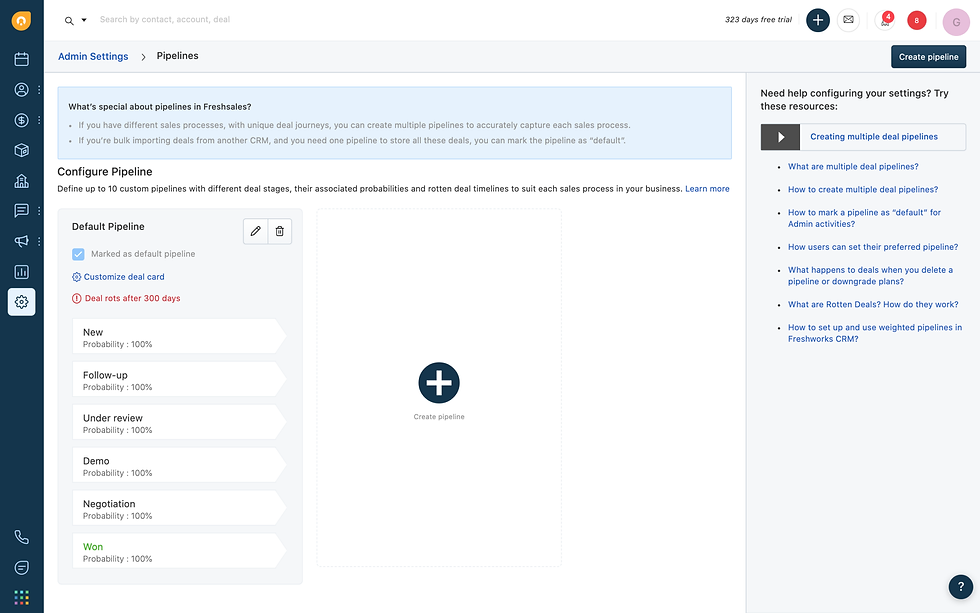
We can even create new sales pipelines for project management, contract maintenance, product installation, and training. After a deal is closed, opportunities can be automatically funneled into a new pipeline, using it for post-sales service management.

Easily Access Analytical Reports
As a sales manager, you must keep abreast of the team's performance at all times. The Pipeline not only lets you grasp every opportunity of the team but also allows you to view sales performance by region, salesperson, or other categories through filters.

Since Freshsales allows for creating custom fields for companies, contacts, or sales opportunities, these custom fields can also become options in filters. We have helped clients design this feature to manage opportunities for agents and distributors, intuitively tracking how many new deals different partners have or deals that are about to close. You can even monitor lost sales opportunities, determine the reasons, and take action.
2. Build an Automated Sales Platform to Boost Efficiency
From discovering new leads to contacting customers and finally closing the deal, salespeople spend a lot of time every day performing repetitive manual tasks, such as filling out paperwork, sending the same email notifications to different customers, tracking customers, and updating records. At the same time, they may spend a lot of time in meetings with customers. As tasks become more complex, the possibility of human error increases.
Using Freshsales' automation workflows can save salespeople from routine chores, simplify workflows, improve efficiency, and reduce the chance of errors.
Freshsales' automation workflows are divided into two types: one is established by setting trigger conditions and executing actions, and the other is triggered by time, executing fixed operations at fixed times. Here are a few use cases:
Auto-Send Messages
When a customer converts from a lead to a valid customer, send an email to introduce yourself; or automatically send a follow-up email one week after a meeting. These routine emails to build closer relationships with customers are repetitive tasks in the sales stage. Establishing an automated process to automatically send emails when the sales stage changes effectively reduces the salesperson's tasks and workload.

Follow-up or Meeting Reminders
With countless meetings every day, some scheduled even a month in advance, it is easy to get disorganized when busy. Set up meeting reminders to automatically send reminders to salespeople one day before the meeting is due, reminding them to prepare for the meeting in advance.

Renewal Reminders
For example, one of our software clients operates on an annual subscription basis. They wanted Freshsales to automatically open a new Opportunity two months before the customer's contract expires. Once the Opportunity is opened, it also serves as a reminder for the salesperson to contact the customer for renewal. Salespeople are saved from the inefficiency and trouble of manually searching for customers who need renewal at fixed times.
3. CPQ System: Automatically Configure Quotes
Freshsales has its own developed CPQ (Configure, Price, Quote) add-on, supporting configuration, pricing, and quoting. It helps companies create invoices or quotes and send them to customers immediately.

Companies can use CPQ to establish standard electronic forms. Salespeople simply need to check the products and quantities and apply discounts or offers to complete the creation of a quotation. Additionally, you can choose to automatically sync quote files, saving the trouble of manually updating records. This not only ensures that price fields are not blank but also ensures that important information related to the transaction is not missed.

CPQ not only helps teams speed up processes but also reduces errors. Even using a calculator and manually checking and modifying can lead to confusion and mistakes, ultimately weakening the customer experience due to quoting errors. The CPQ feature helps sales teams automatically track complex pricing structures and ensures the quoting process is error-free. After the quote is sent, you can also track the status of the file through status updates.
4. Flexible Permission Settings
As a company expands, the sales team may add multiple hierarchical structures and roles. Each member of the team has different responsibilities and permissions on Freshsales. For example: Managers need access to all data, but salespeople may only need to access specific information on the CRM.
Freshsales features flexible permission settings, allowing you to grant different access rights to different members. You can even customize roles to accurately define what content each user can view, create, edit, and delete.

Freshworks offers great flexibility in usage and can be connected in various ways according to user needs.
Welcome to contact us to apply for a trial or learn more about Freshworks information and functions.
Follow our Blog and Facebook to get the latest information from DevOps Tec.

![[Freshdesk + Asana] Convert Tickets into Tasks with One-Click Integration for Status Tracking and Updates!](https://static.wixstatic.com/media/f087dc_c0467129de7e4f2daa54cc6055a047b6~mv2.png/v1/fill/w_980,h_514,al_c,q_90,usm_0.66_1.00_0.01,enc_avif,quality_auto/f087dc_c0467129de7e4f2daa54cc6055a047b6~mv2.png)
![[Freshworks Customer Service Suite] Integrated Support Tools for a Better Customer Experience](https://static.wixstatic.com/media/f087dc_0acc50c56307447a9cc535a545b4ed80~mv2.png/v1/fill/w_980,h_514,al_c,q_90,usm_0.66_1.00_0.01,enc_avif,quality_auto/f087dc_0acc50c56307447a9cc535a545b4ed80~mv2.png)
留言